![3.svg]](https://help.redpocket.com/hubfs/3.svg)
Upgrading or downgrading your plan
-
Log in at redpocket.com/my-lines.
-
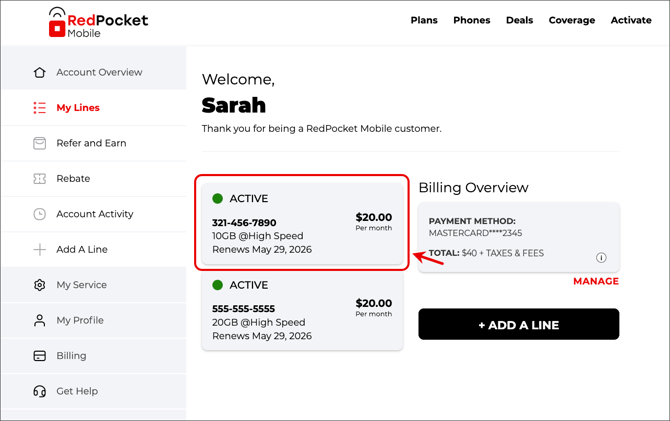
Select your line.
-
Click on Plans.
-
Choose a plan to switch to.
-
Choose when you'd like to change your plan -- now or in the future.
It can take up to 10 minutes for the changes you've made to take effect.
Your plan change will take effect on your next renewal date. You’ll still be charged at that time, but your current plan balances will remain until the new plan begins.
Renewing your plan
-
Log in at redpocket.com/my-lines.
-
Select your line.
-
Underneath the My Plan section, click on Manage Plan.
-
In the popup that appears, select Pay My Bill.
-
Click Pay Now and Save.
-
Complete checkout for your plan.
It can take up to 10 minutes for the changes you've made to take effect.
Renewing an eBay annual plan
-
Order your plan from the eBay store.
-
Check your email for your Activation PIN.
-
Log in at redpocket.com/my-lines.
-
Select your line.
-
Scroll to the bottom of the page and locate the Pin Code field.
-
Enter your activation PIN into the Pin Code field to apply your eBay plan for another billing cycle.
It can take up to 10 minutes for the changes you've made to take effect.
How does changing my plan affect promotional offers?
Important: If your plan includes a plan credit discount or a rebate, some account changes can cause you to lose it. This includes:
- Switching networks with CoverageGenius℠
- Changing your account's SIM card
- Detaching your line from your RedPocket Mobile account